Showing posts with label all samsung flash file. Show all posts
Showing posts with label all samsung flash file. Show all posts
Thursday, December 3, 2015
How To Firmware Update Samsung Galaxy Note 4 Snapdragon SM-N910F
Samsung Galaxy Note 4 Snapdragon SM-N910F Firmware Flash File Download
How To Firmware Update Samsung Galaxy Note 4 Snapdragon SM-N910F
Samsung Galaxy Note 4 Snapdragon SM-N910F SM-N910F DBT Germany
Device Name : Samsung Galaxy Note 4 Snapdragon SM-N910F
Device Model : SM-N910F
Region Country : Germany
Firmware Version : N910FXXU1BOC3
OS Name : Lollipop
OS Version : 5.0.1
Date Update : 2015-03-13
Region Code : DBT
Change List : 4456564
Download Mirror 1
Download Mirror 2

How to Update Firmware Samsung Galaxy Trend Plus GT-S7580 Flash File Download
Samsung Galaxy Trend Plus GT-S7580 Firmware Download
How to Update Firmware Samsung Galaxy Trend Plus GT-S7580
Samsung Galaxy Trend Plus GT-S7580 GT-S7580 VDS Unknow
Device Name : Samsung Galaxy Trend Plus GT-S7580
Device Model : GT-S7580
Region Country : Unknow
Firmware Version : S7580XXUBOC1
OS Name : Jelly Bean
OS Version : 4.2.2
Date Update : 2015-03-03
Region Code : VDS
Change List : 2823165
Download Mirror 1
Download Mirror 2
Samsung Galaxy GT-N7000 Afther update 4.1.2 touch Not working Solve

Samsung Galaxy GT- N7000XXLC1_OXALC1 Firmwrae Downlaod .
GT-N7000 Afther update 4.1.2 touch Not working Solve
GT-N7000 Afther update 4.1.2 touch Not working Solve

Connect to device ...
Device pit saved to D:\BST\backup\samsung\pit\GT-N7000\GT-N7000_2015-11-18_17.48.10.pit
Write file factoryfs.img ...
Write file zimage ...
Write file hidden.img ...
Write file modem.bin ...
Write file cache.img ...
Flash completed
Time used : 4 min 52 s
Samsung Galaxy Grand Prime SM-G530m Cert File Download

Samsung Galaxy Grand Prime SM-G530m Cert File Download
Galaxy SM-G530m Sim Unlock Cert File Download
How To Sim unlock Galaxy SM-G530m
Cert File Download SM-G530m100% Tasted cert download

Samsung Galaxy Grand Prime SM-G530F Cert File Download
Samsung Galaxy Grand Prime SM-G530F Cert File Download
Galaxy SM-G530f Sim Unlock Cert File Download
How To Sim unlock Galaxy SM-G530f
Cert File Download SM-G530f 100% Tasted cert download
SAMSUNG Original SM-E1205y SC6530 (100% Tested ) Factory Flash File Free Download
SAMSUNG Original SM-E1205y SC6530 (100% Tested ) Factory Flash File Free Download
SAMSUNG Original SM-E1205y Official Firmware Free Download Without Password
SAMSUNG Original SM-E1205y 100%Tested CS-Tool Flash File Free Download SAMSUNG Original SM-E1205y Factory file
SAMSUNG Original SM-E1205y official Factory file 100% tested. SAMSUNG Original SM-E1205y Flash File 100% tested download now
SAMSUNG Original SM-E1205y Stock Rom Firmware Download. SAMSUNG Original SM-E1205y Dead boot Recovery Firmware Flash File Download by-CS-Tools
SAMSUNG Original SM-E1205y Customs Roms,Download Here .How To Flash SAMSUNG Original SM-E1205y Android . Official Firmware Download SAMSUNG Original SM-E1205y Officiial Firmware Download Full Free
SAMSUNG Original SM-E1205y Read Flash With CS-Tool
SAMSUNG SM-E1205y Fully Supported (SC6530-8mb)
Download : Here
Action : Read Flash
Boot : SC6530-NOR
Tips:
1.Remove Battery , Insert usb cable, Insert battery
2.power off Phone, Remove & Reinsert Battery , insert USB Cable
(bootkey's Volume Down or volume up)
Waiting for Phone Usb....
Phone found : SPRD U2S Diag (COM38)
Connecting...
Connected done.
sending 1st boot...
FDL test...OK
SC Boot Ver : 6530
SC Boot Mode : 6530C00000005A00
Loading CST Boot image to RAM...
The CST Boot runs normally.
CHIP : SC6500E
CPU ID: 6530C000
NOR ID : 00C8006000170000
NOR Size : 8MB
NOR Name : SF_GD27Q64
Boot Information completed.
Dummping Flash Image Now...
Flash Image size : 8,00MB
Saved to: C:\Users\TIMUR\Desktop\1
Dummping Flash Image Completed.
Action completed
Time taken : 00:02:23
Reconnect Battery/USB Cable
CS-Tool Ver 1.32
Created: 19.09.2015 13:45:11
SAMSUNG Original SM-B310E SC6530 (100% Tested ) Factory Flash File Free Download

SAMSUNG Original SM-B310E SC6530 (100% Tested ) Factory Flash File Free Download
SAMSUNG Original SM-B310E Official Firmware Free Download Without Password
SAMSUNG Original SM-B310E 100%Tested CS-Tool Flash File Free Download SAMSUNG Original SM-B310E Factory file
SAMSUNG Original SM-B310E official Factory file 100% tested. SAMSUNG Original SM-B310E Flash File 100% tested download now
SAMSUNG Original SM-B310E Stock Rom Firmware Download. SAMSUNG Original SM-B310E Dead boot Recovery Firmware Flash File Download by-CS-Tools
SAMSUNG Original SM-B310E Customs Roms,Download Here .How To Flash SAMSUNG Original SM-B310E Android . Official Firmware Download SAMSUNG Original SM-B310E Officiial Firmware Download Full Free
SAMSUNG Original SM-B310E Read Flash With CS-Tool
SAMSUNG SM-B310E Fully Supported (SC6530-8mb)Read Flash
Flash File Link SAMSUNG Original SM-B310E
Info :
Action : Read Flash
Boot : SC6530-NOR
Tips:
1.Remove Battery , Insert usb cable, Insert battery
2.power off Phone, Remove & Reinsert Battery , insert USB Cable
(bootkey's Volume Down or volume up)
Waiting for Phone Usb....
Phone found : SPRD U2S Diag (COM4)
Connecting...
Connected done.
sending 1st boot...
FDL test...OK
SC Boot Ver : 6530
SC Boot Mode : 6530C00000005A00
Loading CST Boot image to RAM...
The CST Boot runs normally.
CHIP : SC6500E
CPU ID: 6530C000
NOR ID : 00C8006000170000
NOR Size : 8MB
NOR Name : SF_GD27Q64
Boot Information completed.
Dummping Flash Image Now...
Flash Image size : 8.00MB
Saved to: C:\Users\stermobile\Desktop\SM-B310E
Dummping Flash Image Completed.
Action completed
Time taken : 00:02:31
Reconnect Battery/USB Cable
CS-Tool Ver 1.33
How to Install Samsung GALAXY S4 LTE I9505XXUHOB7 Android 5.0.1
How to Install Samsung GALAXY S4 LTE I9505XXUHOB7 Android 5.0.1 Russia (Black Edition) Firmware on Galaxy S4 Lte i9505 Full Tutorial
Samsung rolling out Android 5.0.1 update to Galaxy S4 i9505 in the Russia After rolling out Android 45.0.1 update to the Galaxy S4 i9505 in Poland , Russia , Malaysia , and Spain , the upgrade finally lands in the United Kingdom . Oddly, the Korean company's latest Android firmware for the Galaxy S4 Lte is still based o…
Samsung Galaxy I9505XXUHOB7 Android 5.0.1 Stock Firmware Download Samsung Galaxy I9505XXUHOB7 Android 5.0.1 Firmware Download
Instructions
Extract (unzip) the firmware file
Download Odin v3.09
Extract Odin zip-file
Open Odin v3.09
Reboot phone in Download Mode (press and hold Home + Power + Volume Down buttons)
Connect phone and wait until you get a blue sign in Odin
Add the firmware file to AP / PDA
Make sure re-partition is NOT ticked
Click the start button, sit back and wait a few minutes
Easy Repair boot samsung s4 i9500 via sd card
Hot!! Hot!! Easy Repair boot samsung s4 i9500 via sd card!!!
EASY REPAIR BOOT FREE SAMSUNG S4 I9500 VIA SD CARD, 100% TESTED!!
DISABLE SAMSUNG VIA JTAG WORK ON THESE DEVICES WITH A STRONG PROTECTION AND THAT BY THE TIME IS NEEDED TO BREAK THE SAME TIME .....

NEEDED:
1.- Samsung Galaxy S4 GT-i9500 BRICKED O DEAD
2.- MICRO SD CARD 2GB (NOT HC)

3.- JIG O CABLE JIG
4.- USB CABLE
5.- ODIN3 v3.07
6.- FILE REPAIR BOOT S4 I9500 gt-i9500_boot_recovery - Download - 4shared
Boot Recovery process for GT-I9500:
1.- Copying bootloader file to external SD Card, using normal GT-I9500.
2.- Inserting the SD card to ‘No Power’ phone, and copy the bootloader file to the defective PBA.
3.- After downloading bootloader file to the defective phone, enter the download mode with the phone, and download Full S/W.(PIT, PDA, CSC, PHONE files)
4.- Repair Code for Boot Recovery MUST be entered as ‘C3’ on Warranty System (For Europe)
START:
1.- Insert External SD Card to normal phone to copy Bootloader to SD card.
2.- Run Odin3 v3.07.exe

3.- Click ‘Bootloader’ button and load Bootloader file

4.- Enter download mode with the normal phone (SD Card inserted).
※ Download Mode : Volume Down key + Home key + Power Key and press Volume Up key

5.- Connect the phone to PC, using USB cable

6.- Click Start button to copy bootloader to the phone

7.- Disconnect the phone from PC
8.- Close the Odin3 v3.07.exe and Run it again

9.- Click ‘Bootloader’ button and load Bootloader file, and check ‘T Flash’ option in the Odin, to copy bootloader to SD Card. After connecting the phone to PC, click Start button to download bootloader to SD card

10.- After downloading, turn off the phone and remove the SD Card
→ This SD card will be used to recover boot of the phone.
11.- Disassemble the ‘No Power’ phone. Then insert SD card to the PBA

12.- Connect the PBA with Anyway JIG and power supply, with the POWER OFF.
※ Use 11pin cable to supply power to the PBA

13.- Short the ‘TP_NAND_CMD’ to R5103
(HQ uses tweezers to short the resistance)

14.- Turn on the PBA and STOP THE SHORT (remove tweezers) after 3 to 6 seconds from turning on the PBA.
15.- After approximately 5 seconds, you can see message on the LCD boot recovery was succeeded.
16.- Press Volume Down Key to make the phone enter download mode

17.- Download Full S/W including PIT, PDA, CSC and PHONE


Samsung GT-S7562 MTK 6575 Rom Firmware Download 100% Tasted

Samsung GT-S7562 MTK 6575 Firmware Download.Samsung China 7562 mtk 6575 Latest Flash File Download Directly For Free Without Password & Direct Download
This is The Latest Version Firmware Available Allsolutiongsm.com. It is Tested As Well As Good And Working .
Samsung Clone gt-s7562 mtk 6575 firmware latest flash file download
s7562-mt6575 no service Problem done solution
samsung china android mtk 6575 flash file download
2n Others
How to Root Samsung Galaxy S4 I9500 & I9505 using CF-Auto-Root
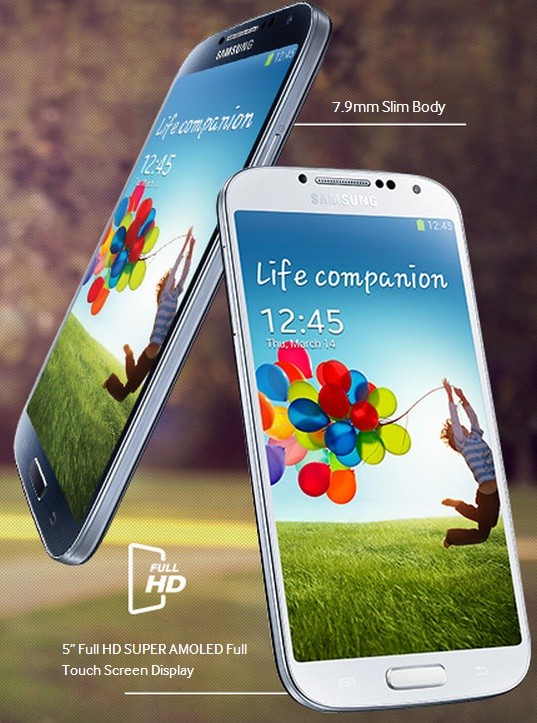
Galaxy S4 running on Android 4.3 can be rooted using CF-Auto-Root.
How to Root Samsung Galaxy S4 I9500 & I9505 using CF-Auto-Root
Galaxy S4 users who have already updated their devices to Android 4.3 and wish to root the same may follow our step-by-step guide. The root method works on both GT-I9500 and GT-I9505. It uses CF-Auto-Root package by recognised XDA developer, Chainfire.
CF-Auto-Root file is for those who wish to keep as close to stock as possible. The root package has SuperSU binary and APK as well as stock recovery. Besides, it is the quickest and easiest root method. The root file is firmware independent as it supports Android 4.3 and future firmwares as well. Head over to the development thread to know more about the features of CF-Auto-Root.
IBTimes UK reminds its readers that it will not be held liable for any mishap. Users are also advised to verify that their devices meet the following requirements.
Pre-requisites
1) Install USB Driver for Samsung Galaxy S4 to transfer files between the Android device and the computer.
2) Enable USB Debugging Mode on phone to connect it with computer and use Android SDK with it. [Press Menu>> Settings>> Applications. From there navigate and click on Development option and check USB Debugging Mode.]
3) As the tutorial might wipe out all data of the phone, create a backup. If the device is having any custom recoveries such as ClockworkMod/TWRP already installed, backup data using the recovery.
4) The Galaxy S4 should have above 80% battery charge.
5) The phone should be factory unlocked and not locked to any particular carrier.
6) The device will lose manufacturer's warranty once it is rooted. However, users can reclaim the warranty back by unrooting the handset later.
7) The CF-Auto-Root files work only on Samsung Galaxy S4 GT-I9500 and GT-I9505. As applying these to any incorrect variant might brick the device, verify the model number of Galaxy S4 by navigating to Settings>> About phone>> Model number and install the root package accordingly.
Steps to root Samsung Galaxy S4 I9500/I9505 on Android 4.3 Jelly Bean
Step-1: Download CF-Auto-Root file for Galaxy S4 to computer
Download links
For GT-I9500- CF-Auto-Root-ja3g-ja3gxx-gti9500.zip
For GT-I9505- CF-Auto-Root-jflte-jfltexx-gti9505.zip
Step-2: Extract the downloaded root zip using Winzip, 7zip, winrar or any other extracting tool to get a file with .tar.md5 extension
CF-Auto-Root-ja3g-ja3gxx-gti9500.tar.md5
CF-Auto-Root-jflte-jfltexx-gti9505.tar.md5
Step-3: Download Odin3_v3.07. Extract the Odin zip to get Odin3 v3.07.exe file
Step-4: Switch off Galaxy S4 and wait for five to six seconds for vibration to confirm complete power off
Step-5: Place the phone in Download Mode by pressing and holding Volume Down, Home andPower buttons together until the construction Android robot icon with a warning triangle appears on the phone's screen. Then press the Volume Up button to enter Download Mode
Step-6: Run Odin3 v3.07.exe as Administrator
Step-7: Connect the phone to the computer using USB cable while it is in Download Mode. Wait for some time until Odin detects the device. When the phone is connected successfully, anAdded message will appear under Odin message box. Additionally, the ID: COM box in Odin will turn blue with the COM port number indicating successful connection
Note: If the Added message does not appear, then try another USB port, try the one located at the back side of the computer. In case Odin still fails to recognise the device then reinstall USB driver.
Step-8: In Odin, click the PDA button and select CF-Auto-Root-ja3g-ja3gxx-gti9500.tar.md5 orCF-Auto-Root-jflte-jfltexx-gti9505.tar.md5 file according to the variants
Step-9: Ensure Auto-Reboot and F.Reset Time checkboxes are selected in Odin
Step-10: Click the Start button in Odin. The installation process should begin now and would take few minutes to complete
Step-11: When the installation process is completed, the phone will restart and soon a PASS message with a green background in the extreme left box at the very top of Odin. Once the home screen appears, unplug the USB cable from the phone to disconnect it from computer
Samsung Galaxy S4 I9500/I9505 running Android 4.3 should now be rooted successfully. You can now install any app that requires root permission. To verify the root method is installed and working properly, install Root Checker app from Google Play Sore.
Troubleshoot issues
Sometimes the device does not boot into Recovery Mode and root the device. If this happens, then perform the entire procedure again. If it still does not install root, ensure Auto Reboot checkbox in Odin is not checked. Then after flashing the root package, pull out the battery and boot the phone into Recovery mode by selecting Volume Up, Home and Power buttons together. This will start the install process.
Samsung China GT-S7582 Mtk 6572 V1.2XXX3-2014123 Official Firmware 100% Tasted Download

Samsung China GT-S7582 Mtk 6572 V1.2XXX3-2014123 Official Firmware 100% Tasted Download .Samsung 7582 mtk 6572 firmware Download
Samsung Clone S7582 Mtk 6572 V1.2XXX3-2014123 Firmware Flash File Download Directly For Free Without Password & Direct Download
This is The Latest Version Firmware Available Allsolutiongsm.com.It is Tested As Well As Good And Working .
s7582 mt6572 new version 100% tested
by
helpful-man
by
helpful-man
VERSION-V1.2XXX3-2014123
Wednesday, December 2, 2015
Samsung-Clone Galaxy grand-2 SM-G7106-(MT6572) Official Firmware 100% Free Download
Samsung-Clone Galaxy grand-2 SM-G7106-(MT6572) Official Firmware
100% Free Download
CPU :-MT6572

100% Free Download
CPU :-MT6572
Download Link
Rar Password= www.dhakagsm.com(solim)
Rar Password= www.dhakagsm.com(solim)
Subscribe to:
Posts (Atom)